
Photoshop
Photoshop scratch disk full on Mac
Published April 18, 2026, updated April 18, 2026
Quick answer
Free real disk space on the drive Photoshop uses as its scratch disk, then reopen Photoshop. If Photoshop will not launch, hold Command + Option while opening it to choose another scratch disk. Cache Kid can help review Adobe and creative app cache before rebuildable files move to Trash.
Photoshop scratch disk full on Mac means Photoshop has run out of temporary working space, usually on your startup disk. Free real disk space first, then reopen Photoshop. If Photoshop will not launch, hold Command + Option while opening it and pick another scratch disk with more room.
Quick fix: empty Trash, free space on the scratch disk, restart Photoshop, then check Photoshop > Settings > Scratch Disks.
What the scratch disk error actually means
Photoshop uses scratch disk space when RAM is not enough for layered files, big canvases, filters, history states, and recovery data. On most Macs, the scratch disk is Macintosh HD unless you changed it.
Adobe's current Photoshop scratch disk guidance now tells heavy users to keep a lot of free space available. Adobe mentions at least 100 GB on the primary scratch disk for demanding work. For lighter files you may get away with less, but if you are compositing huge PSDs, do not treat 10 GB free as enough.
What to do first
- Empty Trash so deleted files actually release space
- Open System Settings > General > Storage and check the scratch disk
- Move old exports, installers, screen recordings, and archives off Macintosh HD
- If Photoshop opens, choose Edit > Purge > All after saving your work
- If Photoshop will not open, hold Command + Option while launching Photoshop and choose a roomier drive
Change the Photoshop scratch disk
If you have a fast external SSD or another internal volume with more space, assign it as a scratch disk in Photoshop > Settings > Scratch Disks. Restart Photoshop after changing it.
Use a fast, reliable drive formatted for macOS. A slow thumb drive or nearly full portable disk can make Photoshop feel worse, especially when you are pushing large retouching files or multi-gigabyte mockups.
Clear Adobe cache without touching PSD files
Photoshop scratch data is not the same thing as your PSD files. Adobe apps can also leave media cache, preview files, logs, and temporary data under your Library folder, including shared Adobe locations used by Premiere Pro, After Effects, and Media Encoder.
If you are clearing space because Photoshop will not work, this is the point where guessing in Finder gets risky. Cache Kid scans known Adobe and creative app cache folders, shows the paths and sizes it found, and moves only selected items to Trash.
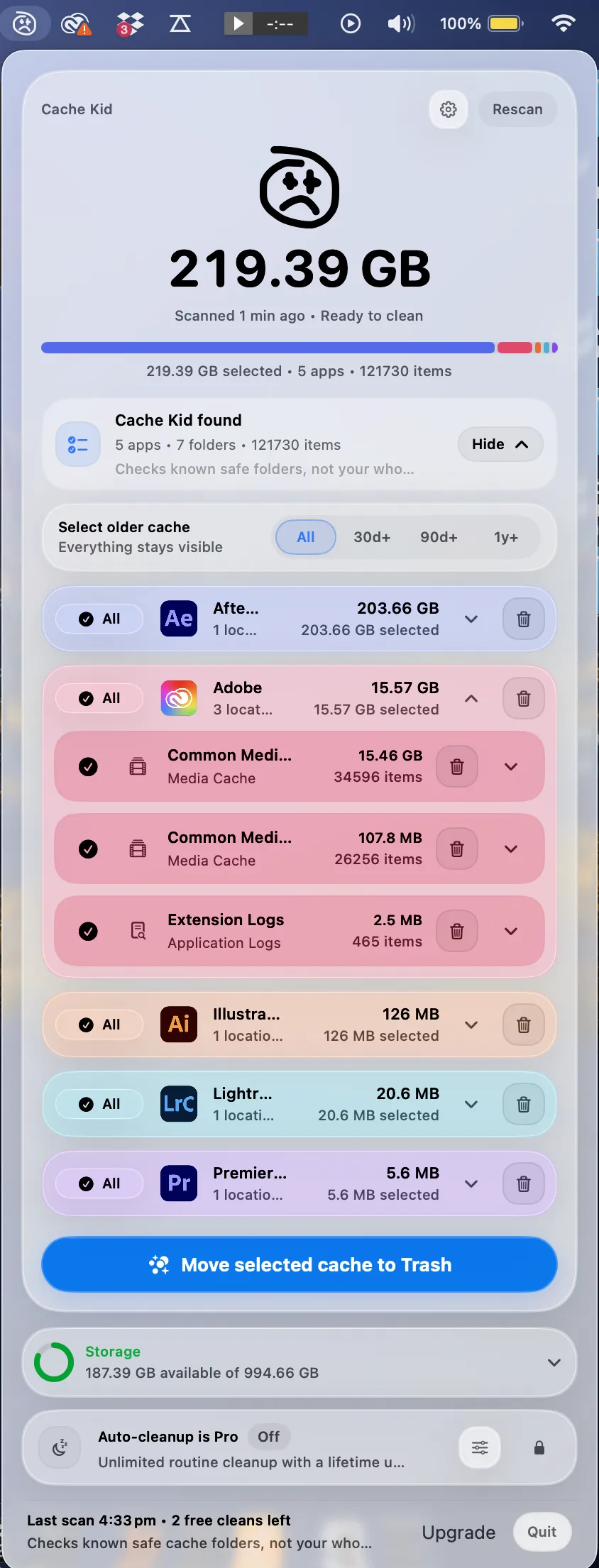
What Cache Kid will not fix
Cache Kid does not change Photoshop scratch disk preferences, add RAM, or repair a broken Photoshop install. If Photoshop keeps showing the error after you have plenty of free space, update Photoshop, check scratch disk settings, reduce History States in Photoshop > Settings > Performance, and consider resetting Photoshop preferences.
Prevent the error coming back
- Keep a serious free-space buffer on the scratch disk, especially for layered files
- Store old exports and project archives outside your startup disk
- Reduce History States for huge files if you do not need deep undo
- Keep Adobe cache cleanup focused on rebuildable files, not documents
- Review creative cache after big delivery weeks, not during a deadline
Last verified with macOS 15 and Adobe Photoshop scratch disk guidance updated in 2026.
Related guide
Clear Adobe Creative Cloud Cache on Mac
Want the full cleanup walkthrough? This guide explains where the cache lives and what is safe to review before moving anything to Trash.
Review before you clear
Try Cache Kid for Adobe cache
Cache Kid is a macOS menu bar app that scans known Adobe cache folders, shows you what it found, and moves only what you select to Trash. Scans are free. Nothing is permanently deleted until you empty Trash yourself.
Scan, review sizes and paths, then clear only what you choose from the menu bar.
Scans are free. Upgrade only when you are ready to clear more.
Frequently asked questions
- Does scratch disk full mean my Mac has no RAM?
- Not always. Photoshop uses disk space as temporary working memory when RAM is not enough. The error usually means the scratch disk is too full for Photoshop to create temporary files.
- Can Cache Kid clear Photoshop scratch disk files?
- Cache Kid can help review Adobe cache and creative app temporary files. Photoshop scratch disk settings still live inside Photoshop, so you may also need to change the scratch disk, reduce History States, or free disk space manually.
- Will clearing Adobe cache delete my PSD files?
- No, not if you only clear cache folders. PSD files, exports, and source assets are separate from cache. Cache Kid is designed to avoid documents and creative work.
More posts
Adobe
Adobe Common Folder Huge on Mac
Learn why the Adobe Common folder can grow so large on Mac and how to review media cache without deleting projects.
June 20, 2026
Mac Storage
Top Mac Cleaning Apps for Creatives in 2026
Compare general Mac cleaners and focused creative cache tools for Photoshop, Premiere Pro, After Effects, Resolve, and Final Cut Pro workflows.
June 20, 2026
Mac Storage
Why Is Mac Storage Still Full After Deleting Files?
Troubleshoot why free space does not return after deleting files on Mac, from Trash and snapshots to hidden creative cache.
June 13, 2026