
Adobe
Adobe Common folder huge on Mac
Published June 20, 2026, updated June 20, 2026
Quick answer
The Adobe Common folder can become huge because Premiere Pro, After Effects, Media Encoder, and other Adobe apps share media cache and database files there. Quit Adobe apps first, use in-app cache controls where possible, and review Adobe Common before moving anything to Trash.
The Adobe Common folder can become huge because Adobe apps share media cache, cache databases, conformed audio, peak files, and helper files there. Premiere Pro, After Effects, and Media Encoder can all contribute to the same area, so one folder can grow even if you only remember working in one app.
Quick fix: quit Adobe apps, use Premiere or After Effects cache settings first, then review Adobe Common before moving anything to Trash.
Where Adobe Common lives on Mac
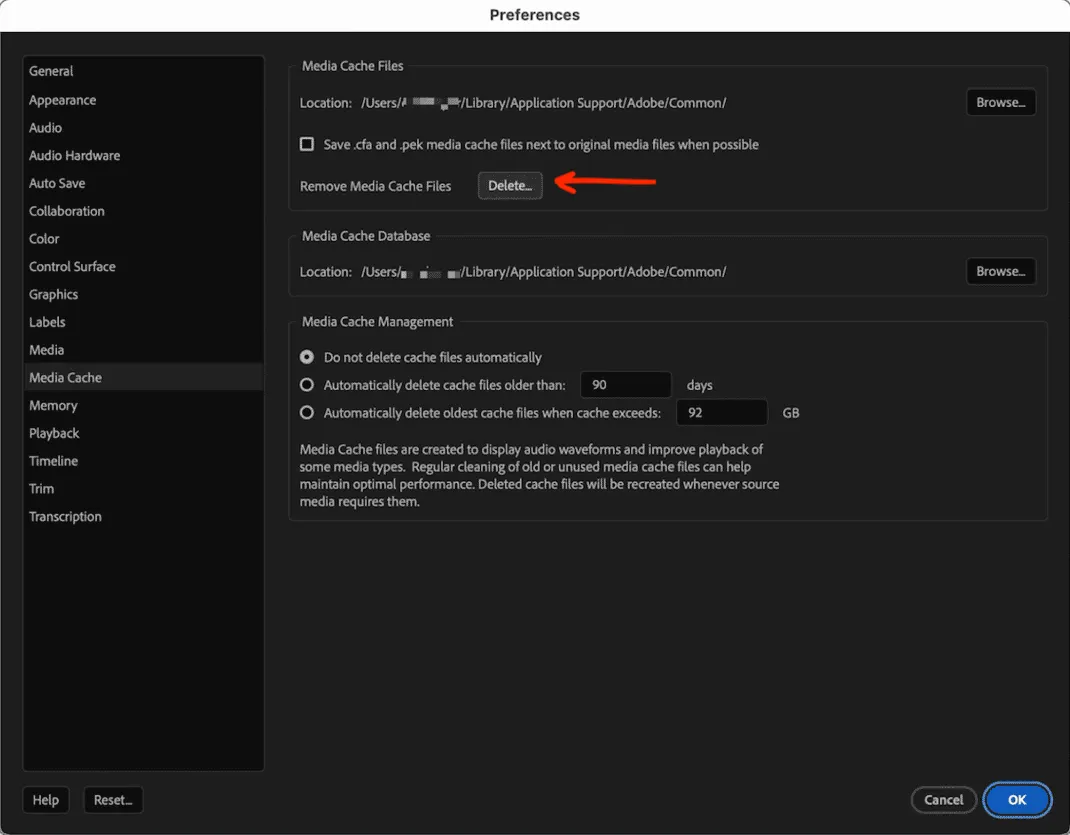
The Adobe Common cache path most editors run into is ~/Library/Application Support/Adobe/Common. Adobe's current Premiere manual cleanup guidance lists that location for macOS, and After Effects uses the same shared media cache area for imported media.
Inside that folder, the big ones are usually Media Cache and Media Cache Files. Those are different from your project files, exports, and source footage.
Why it gets so large
Adobe apps cache imported video and audio so timelines open faster and waveforms, previews, and conformed files do not need to rebuild every time. That is useful while a job is active.
The mess starts after delivery. Cache from old jobs can hang around, especially if automatic media cache cleanup is not enabled or if several Adobe apps are feeding the same shared folder.
What to do first
- Quit Premiere Pro, After Effects, Media Encoder, Photoshop, and Creative Cloud apps
- Use Premiere Pro > Settings > Media Cache if Premiere still opens
- Use Edit > Purge > All Memory & Disk Cache in After Effects when it makes sense
- Review folder names and paths before moving anything
- Keep project files, source media, exports, catalogs, and presets untouched
Can I delete the whole Adobe Common folder?
Avoid deleting the whole Adobe Common folder blindly. Some content is rebuildable cache, but broad deletion can cause big rebuilds, reset useful state, or make troubleshooting harder than it needs to be.
If you clean manually, focus on known media cache folders and keep the parent structure intact where possible. Close Adobe apps first, then empty Trash only after you are confident the apps reopen correctly.
Where Cache Kid helps
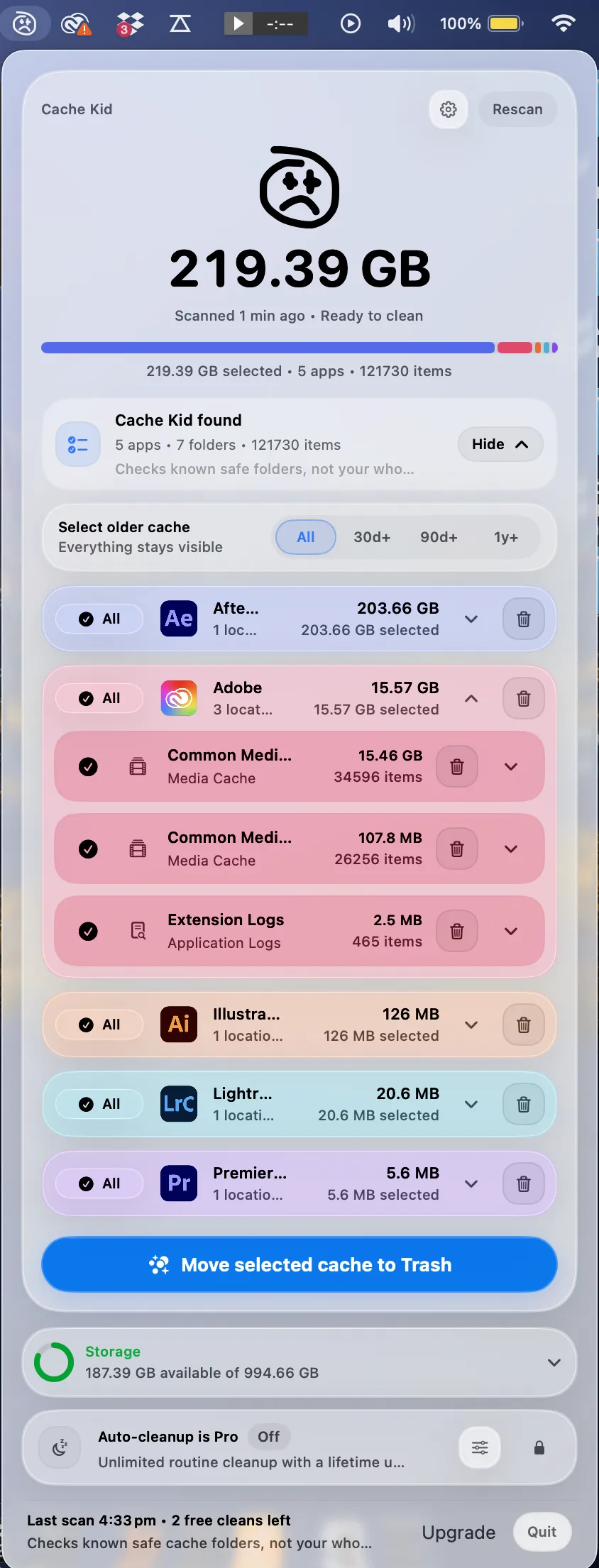
Cache Kid scans known Adobe cache locations and shows what it found before anything moves. It is built for the moment when you know Adobe cache is huge but do not want to guess in Finder.
Selected items go to Trash, not permanent delete.
How to stop Adobe cache growing again
- Enable automatic media cache cleanup by age or size in Premiere
- Empty After Effects disk cache after large projects
- Keep a free-space buffer on your startup disk
- Scan creative cache after big exports or project deliveries
- Move active cache to a fast SSD only if that drive is always connected when you work
Last verified with Adobe media cache guidance updated in 2026 and current macOS 15 behavior.
Related guide
Clear Adobe Creative Cloud Cache on Mac
Want the full cleanup walkthrough? This guide explains where the cache lives and what is safe to review before moving anything to Trash.

Review before you clear
Try Cache Kid for Adobe cache
Cache Kid is a macOS menu bar app that scans known Adobe cache folders, shows you what it found, and moves only what you select to Trash. Scans are free. Nothing is permanently deleted until you empty Trash yourself.
Scan, review sizes and paths, then clear only what you choose from the menu bar.
Scans are free. Upgrade only when you are ready to clear more.
Frequently asked questions
- What is stored in Adobe Common on Mac?
- Adobe Common can include shared media cache, media cache databases, conformed audio, peak files, preview helper files, and other temporary Adobe data used by multiple Creative Cloud apps.
- Can I delete the whole Adobe Common folder?
- Avoid deleting the whole folder blindly. Use Adobe cache controls first or review the contents carefully. Some files are rebuildable, but broad deletion can cause unnecessary rebuilds or confusion.
- Why does Adobe cache come back?
- Adobe apps rebuild cache as you import media, preview timelines, render, and export. Cleanup frees old cache, but active projects will create new cache again.
More posts

Mac Storage
Top Mac Cleaning Apps for Creatives in 2026
Compare general Mac cleaners and focused creative cache tools for Photoshop, Premiere Pro, After Effects, Resolve, and Final Cut Pro workflows.
June 20, 2026
Mac Storage
Why Is Mac Storage Still Full After Deleting Files?
Troubleshoot why free space does not return after deleting files on Mac, from Trash and snapshots to hidden creative cache.
June 13, 2026
Safety
What Cache Files Are Safe to Delete on Mac?
A creative-friendly guide to which Mac cache files are usually safe to review and which project files you should leave alone.
June 6, 2026