
After Effects
After Effects disk cache full and out of memory on Mac
Published May 9, 2026, updated May 9, 2026
Quick answer
Quit heavy apps, purge After Effects memory and disk cache, then reduce disk cache size if your drive is nearly full. Cache Kid can review shared Adobe cache after you use After Effects built-in cleanup.
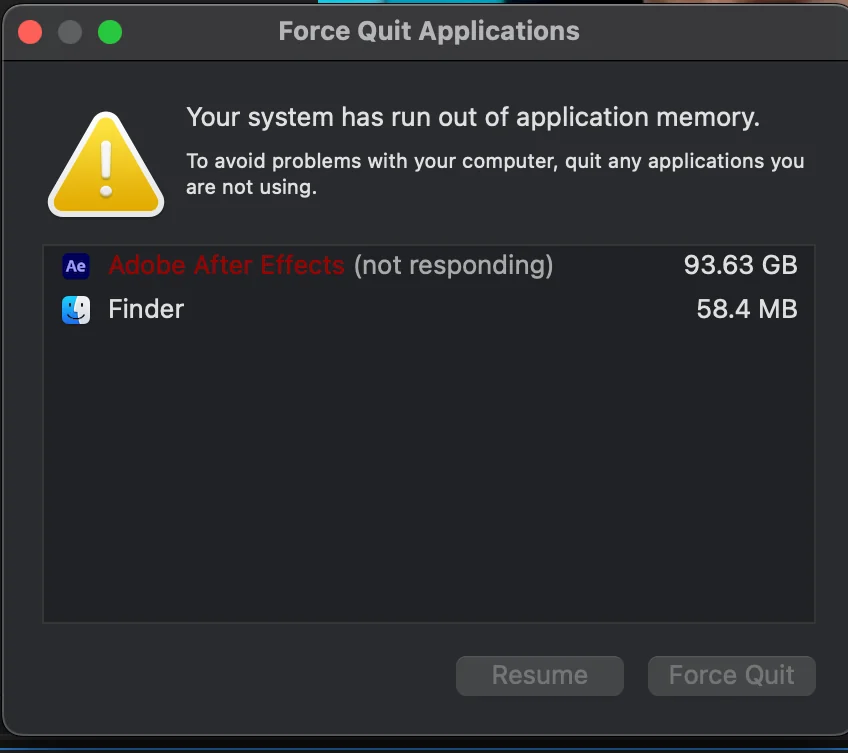
If After Effects shows an out-of-memory warning on Mac, close the other heavy apps, purge memory and disk cache, then check free disk space. After Effects can rebuild previews, but a packed startup disk makes everything worse because macOS needs room for swap.
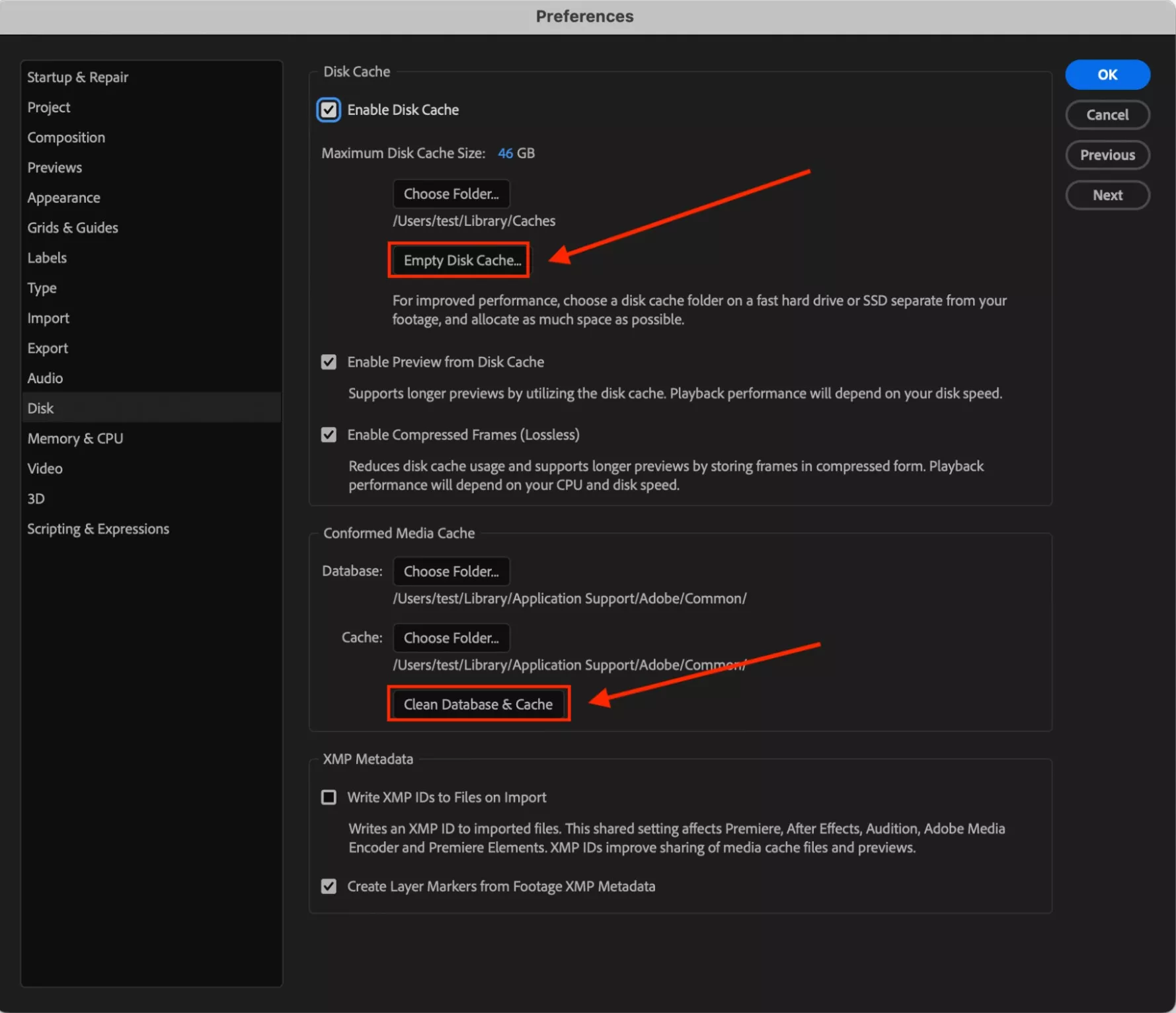
Quick fix: choose Edit > Purge > All Memory & Disk Cache, then check After Effects > Settings > Media & Disk Cache.
Why After Effects runs out of memory
After Effects can hit the macOS memory warning when a comp is too heavy, when a plugin is leaking memory, when disk cache has grown too large, or when your startup disk is too full for swap files.
Clearing cache helps when storage is the bottleneck. It will not magically make a 3D comp, a giant precomp stack, or a noisy effect chain fit into memory.
RAM cache vs disk cache vs media cache
| Cache type | Where it lives | What happens when cleared |
|---|---|---|
| RAM cache | Memory | Preview frames rebuild during the session |
| Disk cache | Storage drive | Cached frames rebuild later |
| Media cache | Adobe shared folders | Imported media may reconform or rebuild |
Adobe's After Effects memory and storage guide confirms that RAM cache clears when you quit, while disk cache can persist on your drive. Adobe also notes that the default maximum disk cache size is based on the volume size, up to 100 GB.
What to do first
- Quit Premiere, Media Encoder, browsers, and anything chewing RAM
- Use Edit > Purge > All Memory & Disk Cache
- Open Settings > Media & Disk Cache and empty disk cache
- Lower the maximum disk cache size if the drive is nearly full
- Restart your Mac if memory pressure stays high
Review shared Adobe cache with Cache Kid
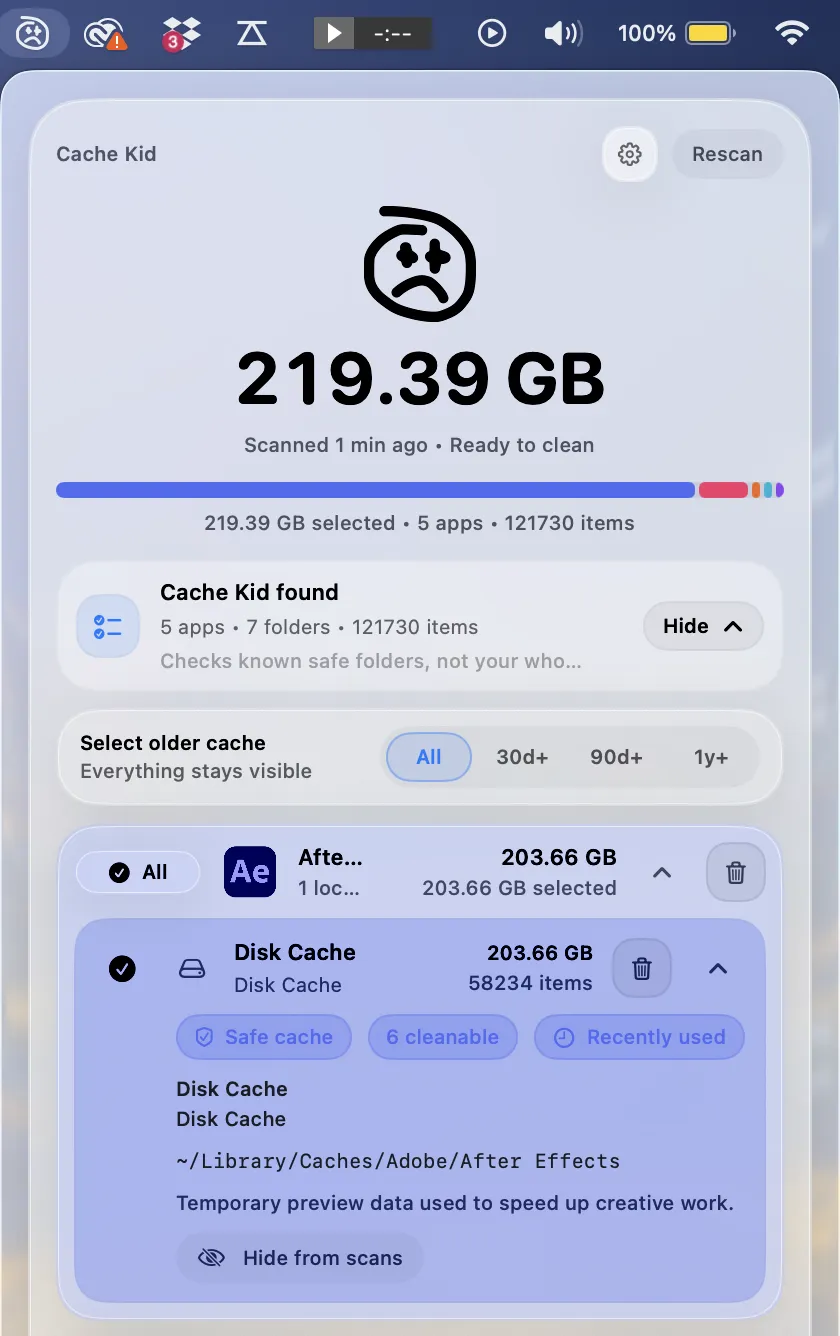
After Effects often shares Adobe media cache with Premiere Pro and Media Encoder. Adobe cache commonly lives under ~/Library/Application Support/Adobe/Common, while disk cache can also live under Adobe cache folders in your user Library depending on settings.
Use After Effects built-in purge commands first when the app opens. Use Cache Kid when you want a broader review of Adobe and creative app cache across your Mac, with paths and sizes visible before selected items move to Trash.
What Cache Kid will not fix
Cache Kid will not add RAM, simplify a composition, remove heavy effects, or fix broken plugins. If a single frame cannot fit into memory, After Effects may still fail even after disk cache is cleared.
What to expect after cleanup
After Effects may preview more slowly at first because it needs to rebuild cached frames. That is normal. Your .aep project and source footage are separate from disk cache.
Last verified with macOS 15 and current Adobe After Effects memory and storage guidance.
Related guide
Clear After Effects Cache on Mac
Want the full cleanup walkthrough? This guide explains where the cache lives and what is safe to review before moving anything to Trash.

Review before you clear
Try Cache Kid for After Effects cache
Cache Kid is a macOS menu bar app that scans known After Effects cache folders, shows you what it found, and moves only what you select to Trash. Scans are free. Nothing is permanently deleted until you empty Trash yourself.
Scan, review sizes and paths, then clear only what you choose from the menu bar.
Scans are free. Upgrade only when you are ready to clear more.
Frequently asked questions
- What is the difference between RAM cache and disk cache?
- RAM cache lives in memory and helps previews play during the current session. Disk cache is stored on your drive and can persist after you quit After Effects, so it is more likely to become a storage problem.
- Will purging After Effects cache delete my composition?
- No. Your .aep file and footage remain separate. After Effects may need to rebuild previews after cache is cleared.
- Can Cache Kid replace After Effects cache settings?
- No. Use After Effects settings for disk cache size and purge commands. Cache Kid helps review related Adobe cache files from outside the app.
More posts
Adobe
Adobe Common Folder Huge on Mac
Learn why the Adobe Common folder can grow so large on Mac and how to review media cache without deleting projects.
June 20, 2026

Mac Storage
Top Mac Cleaning Apps for Creatives in 2026
Compare general Mac cleaners and focused creative cache tools for Photoshop, Premiere Pro, After Effects, Resolve, and Final Cut Pro workflows.
June 20, 2026
Mac Storage
Why Is Mac Storage Still Full After Deleting Files?
Troubleshoot why free space does not return after deleting files on Mac, from Trash and snapshots to hidden creative cache.
June 13, 2026